
NCLEX time management comes down to one number you cannot know in advance: how many items you will receive. Your exam might end at 85 or run to 150, and those two outcomes imply completely different per-item budgets.
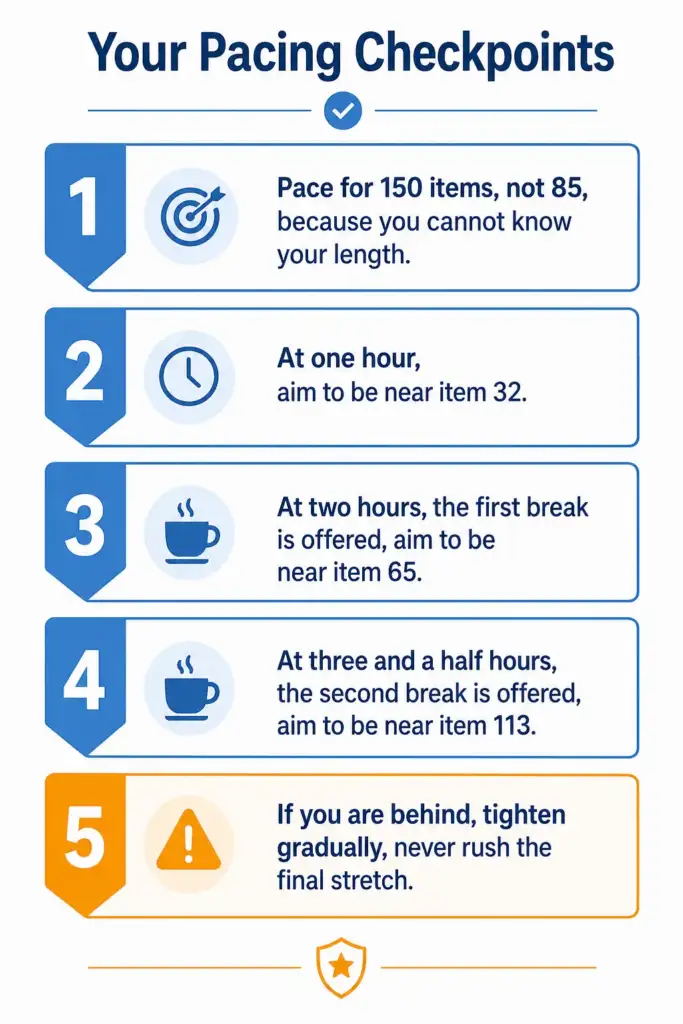
There is only one safe way to handle that. Pace for the maximum. If you budget for 85 items and receive 150, you run out of time. If you budget for 150 and finish at 85, you finish comfortably with time unused and no penalty whatsoever.
That single decision does most of the work. The rest is knowing which item types genuinely deserve more of your time, and what to do if you fall behind.
Quick Answer
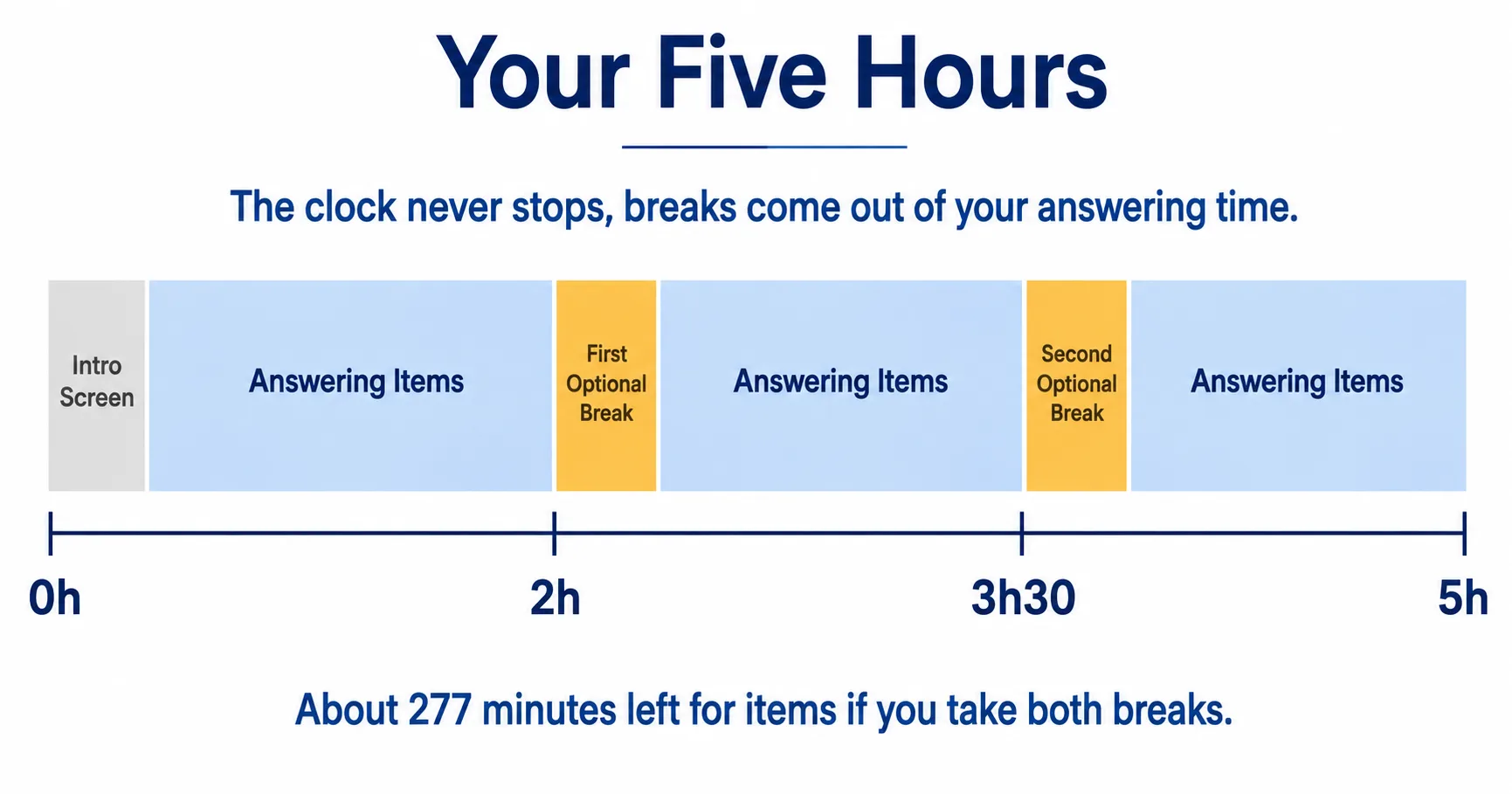
You have five hours for the NCLEX, and that includes the introductory screen and every break you take. If you take both offered breaks, roughly 277 minutes remain for answering. Pacing for the 150-item maximum gives an average of about 1 minute 50 seconds per item. Standard multiple-choice items should take around 60 to 75 seconds, while bow-tie, trend and case study items reasonably take two and a half to three minutes each.
What Five Hours Actually Buys You
The five-hour limit is not five hours of answering questions. Total examination time includes a short introductory screen, two preprogrammed optional breaks, and any unscheduled breaks you take. All breaks count against testing time, and the exam clock does not stop while you are on one.
That last point catches people out. A ten-minute break is ten minutes removed from your answering time.
Working through it:
| Minutes | |
|---|---|
| Total appointment | 300 |
| Introductory screen | about 3 |
| Two breaks, if taken, at about 10 minutes each | about 20 |
| Remaining for items | about 277 |
Divide 277 minutes by the 150-item maximum and you get roughly 1 minute 50 seconds per item as your working average.
Divide it by 85 instead and you get 3 minutes 15 seconds. That is the trap. Pacing at three minutes an item feels comfortable and reasonable, and it puts you at item 92 when the five hours expire.
The break structure is fixed: the first optional break is offered after two hours of testing, the second after three and a half hours. Both are optional, and the computer tells you when they begin.
How Long Per Question Type
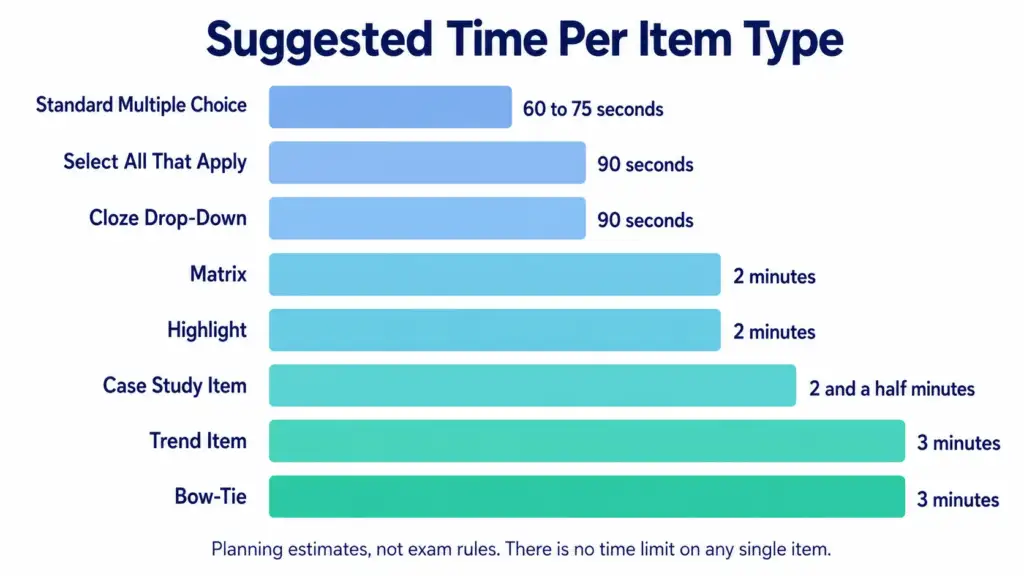
Not every item deserves the same time, and treating them as equal is inefficient in both directions. A straightforward pharmacology item does not need two minutes. A case study item with four chart tabs cannot be done well in ninety seconds.
These are planning estimates rather than rules. There is no time limit on any individual NCLEX item.
| Item type | Suggested time | Why |
|---|---|---|
| Standard multiple choice | 60–75 seconds | One stem, four options, one decision |
| Select all that apply | 90 seconds | Each option needs its own yes or no |
| Cloze / drop-down | 90 seconds | Several blanks, but each is a small decision |
| Matrix / grid | 2 minutes | One judgment per row, repeated |
| Highlight | 2 minutes | Requires reading a passage before selecting |
| Case study item | 2.5 minutes | Chart tabs to open, plus one clinical judgment step |
| Trend item | 3 minutes | Serial data to read across before deciding |
| Bow-tie | 3 minutes | Five targets covering a full reasoning arc |
Two things to notice.
The expensive items are the clinical judgment items, and there is a fixed number of them. Every exam has 18 case study items. Stand-alone clinical judgment items, meaning bow-tie and trend, account for approximately 10% of your exam. You can predict that load in advance, which is what makes a budget possible.
Reading time is the variable, not deciding time. The items that take longer take longer mostly because there is more to read before you can think. This is why rushing the reading to save time backfires: you end up making the same decision on worse information.
Does the Budget Add Up?
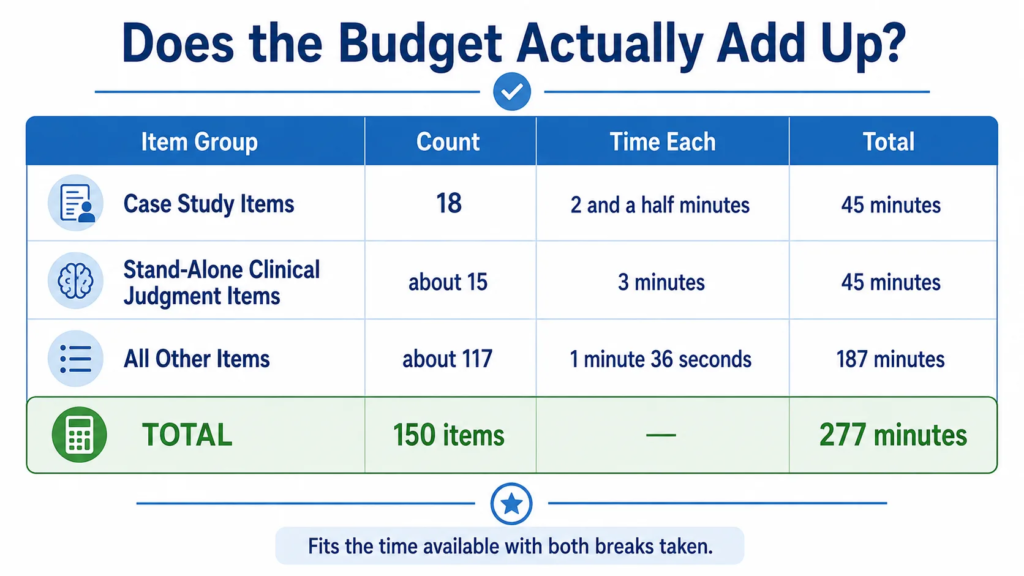
A time budget that does not sum to the available minutes is not a budget. Here is the arithmetic on a maximum-length exam.
| Item group | Count | Time each | Total |
|---|---|---|---|
| Case study items | 18 | 2.5 min | 45 min |
| Stand-alone clinical judgment items | about 15 | 3 min | 45 min |
| All other items | about 117 | 1 min 36 sec | 187 min |
| Total | 150 | 277 min |
It fits, with both breaks taken.
Notice what that requires of the ordinary items: 1 minute 36 seconds each. That is the real constraint, and it is where exams are lost. Not on the bow-tie you spent four minutes on, but on the forty routine items you spent two and a half minutes on each because you were being thorough.
Thoroughness on a straightforward item has a cost, and the cost is charged to the hard items later.
Pacing Checkpoints You Can Actually Use

Tracking a per-item average in your head is not realistic. Use a handful of checkpoints instead.
At roughly 1 minute 50 seconds per item:
| Time elapsed | You should be near |
|---|---|
| 1 hour | item 32 |
| 2 hours (first break offered) | item 65 |
| 3 hours 30 minutes (second break offered) | item 113 |
| 5 hours | item 150 |
The two break prompts are convenient natural checkpoints, because the computer tells you when you reach them. Use them as your pacing checks whether or not you take the break.
A reassuring consequence of this arithmetic: at this pace you reach item 85 at around two hours forty minutes, with well over two hours remaining. The run-out-of-time rule fails you automatically only if you have not answered the minimum number of items, and at a reasonable pace that scenario is not close. Candidates who fall foul of it are almost always people who spent four or five minutes each on early items, not people who were merely careful.
What NCSBN Says About Rushing
This is the part most time management advice gets backwards, and it comes directly from the candidate bulletin.
NCSBN warns that rapid guessing can drastically lower your score. Their explanation is worth understanding: some test preparation companies advocate rapid guessing when time is running short, on the logic that unanswered items are marked wrong so a few lucky guesses can only help. On a paper exam that reasoning holds. On an adaptive test, NCSBN describes it as potentially disastrous, because wrong answers lead the algorithm to give you easier items, which drives your ability estimate further down.
Their stated advice is to maintain a reasonable pace and carefully read and consider each item before answering.
Think about what that means for the endgame. If you find yourself at item 120 with fifteen minutes left, the intuitive move is to blast through the remaining items to reach the end. That move actively lowers your ability estimate. Every rushed wrong answer pulls the estimate down and pulls the next item down with it.
There is no clever recovery here, which is exactly why the pacing checkpoints matter. The solution to running out of time is not to speed up at the end. It is to not arrive there. If you are behind at the two-hour checkpoint, tighten gradually across the next fifty items rather than dramatically across the last ten.
Should You Take the Breaks?
Both breaks are optional, and both cost you answering time. So the question is real.
The arithmetic: a ten-minute break costs about five and a half items of budget at your working pace.
The case for taking one anyway is that NCSBN’s own advice is to read carefully and consider each item, and fatigue is what stops people doing that. If you are four hours in and re-reading stems because nothing is going in, five and a half items is a cheap price for restoring your accuracy on the forty items still to come.
A reasonable approach:
- Plan to take the first break at the two-hour mark, briefly. Five minutes is enough to stand up, use the restroom and reset. It also gives you a natural pacing checkpoint.
- Decide the second break in the moment, based on how you actually feel rather than on a plan made weeks earlier.
- Keep breaks short. The clock is running, and the benefit of a break is mostly in the first few minutes.
Two practical notes. You must leave the testing room during any break, and you provide a palm vein scan on the way out and on the way back, so the actual cost is a little more than the time you spend away from the desk. And you cannot access your phone, notes or any study material at any point, including during breaks.
Common Time Management Mistakes
Pacing for 85 items. The single most costly error. You cannot know your length, and only one assumption is safe.
Over-investing in the first twenty items. Early items feel important because the estimate is still rough. Every item counts the same amount, and the estimate uses all of them.
Rushing the last stretch. NCSBN says this can be disastrous on an adaptive test. Fix the pace early instead.
Re-reading an item you have already decided. If you have made your decision, submit it. You cannot return to it anyway once you advance.
Treating a familiar-looking item as a signal. You may receive an item that seems similar to an earlier one. NCSBN states it is incorrect to assume this happened because you answered the first one wrong. Answer it on its merits and move on.
Counting items instead of watching the clock. The item number tells you nothing about your performance. Elapsed time against your checkpoints is the only exam-day metric worth tracking.
Forgetting the clock runs during breaks. Budget for them.
Trying to be equally thorough on every item. The budget only works if routine items are handled at routine speed.
How to Practise Pacing

Pacing is a skill you can train, and it is the one exam-day skill most candidates never practise.
Do full-length timed sessions. Not blocks of 25 questions. Your budget assumes a working pace you can hold for four and a half hours, and there is no way to find out whether you can except by doing it. Two or three full-length sessions before your exam date is a reasonable target.
Practise at your appointment time. If you test at 8am, a run of 8am practice sessions tells you something an evening session will not.
Track time per item type during review, not during practice. Watching a clock while answering trains anxiety rather than pacing. Instead, note the finish time for a whole set and work out afterwards where the minutes went. Most people discover their time is disappearing into ordinary items rather than the hard ones they remember struggling with.
Rehearse the checkpoint response. Decide now what you will do if you hit the two-hour mark at item 50. The answer is to shave fifteen seconds off each routine item for the next fifty, not to panic. Having decided that in advance makes it possible to do it calmly.
If you are preparing systematically, a review program that builds reasoning rather than answer-selection technique helps here in a way that is easy to miss. Most time on a hard item is spent deciding between two plausible options, and candidates who reason from cues rather than eliminating by pattern reach that decision faster. Programs like NCLEX High Yield that teach the clinical judgment process address the underlying cause of slow items rather than the symptom.
Key Takeaways
- Five hours includes the introductory screen and every break. The clock does not stop.
- Taking both offered breaks leaves roughly 277 minutes for items.
- Pace for the 150-item maximum, about 1 minute 50 seconds per item on average.
- Standard multiple choice deserves 60 to 75 seconds. Bow-tie, trend and case study items reasonably take 2.5 to 3 minutes.
- There is no time limit on any individual item.
- The first optional break is offered after two hours of testing, the second after three and a half hours.
- NCSBN warns that rapid guessing when time is short can be disastrous on an adaptive test, because wrong answers drive the ability estimate down.
- Fix your pace early. There is no effective way to recover time at the end.